
Build Audio-Synced AI Videos with the Affordable Wan 2.5 API on Kie.ai
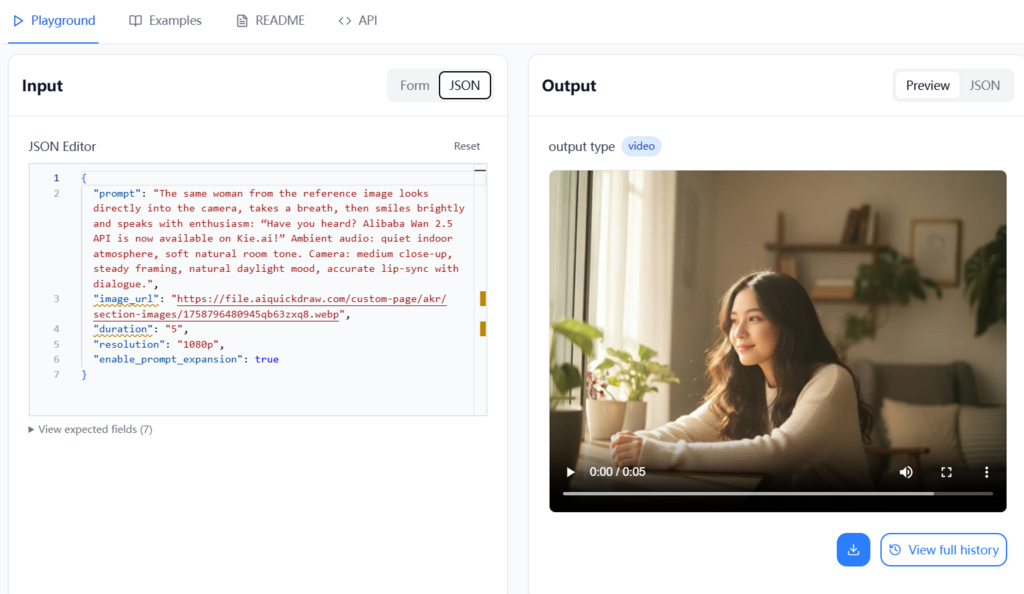
AI video generation can turn a text prompt or still image into a polished clip, but integrating it into an application involves more than choosing a model. Developers need to authenticate requests, submit jobs, handle asynchronous results, and keep video costs predictable. Kie.ai provides access to Alibaba’s Wan 2.5 video generation API, including text-to-video and image-to-video workflows.
Wan 2.5 is designed to generate video with synchronized audio, making it useful for product explainers, social content, learning materials, and creative prototypes. This guide explains what the API can do, how to approach pricing, and how to build a practical integration without exposing your credentials or assuming a generation job finishes immediately.
What Is the Wan 2.5 API on Kie.ai?
The Wan 2.5 AI API makes Alibaba’s video-generation model available through Kie.ai. Depending on the workflow supported by the current model endpoint, you can provide a text prompt or an input image and request a generated clip. Wan 2.5’s key distinction is its audio-video generation approach: audio and visuals are produced as parts of one result, rather than requiring every project to assemble a soundtrack in a separate step.
That can simplify an application’s pipeline, but generated results still need review. Treat speech, lip synchronization, image composition, and other prompt-dependent details as outputs to validate—not guarantees. Model features, available options, and limits can change, so check Kie.ai’s live endpoint documentation before building around a specific parameter or output format.
Why Developers Use Wan 2.5 for AI Video
Text-to-video and image-to-video workflows
Text-to-video is useful when a user describes a scene in natural language. Image-to-video starts with a supplied image and asks the model to animate or extend its visual direction. For either workflow, a focused prompt generally gives you more control than a long list of conflicting instructions.
Audio and visual generation in one workflow
Native audio generation can reduce the need to coordinate separate video and audio jobs. It may be useful for scenes with dialogue, atmosphere, or other sound, but review the result before publishing. If your product requires exact wording, a particular voice, or frame-accurate timing, test those requirements with representative prompts and provide an editing or fallback path.
Prompt-led creative control
Describe the subject, action, setting, mood, and camera movement in clear language. For example: “A small ceramic coffee cup on a bright kitchen counter, gentle morning light, slow camera push-in, calm product-advertising style.” Avoid asking for several unrelated scenes in one short clip.
Affordable Wan 2.5 API Pricing: What to Check
Video-generation costs can depend on factors such as resolution, duration, model variant, and the pricing rules in effect when you submit a task. Earlier advertised rates should not be treated as a permanent quote. Before estimating a launch budget, confirm the current Wan 2.5 pricing and billing unit on Kie.ai’s model page or account dashboard.
Use a small test set to estimate your actual spend. Include failed or discarded generations in your calculation, and set application limits so a user cannot accidentally request an excessive number of long clips.
- Verify the current price for the exact model and output settings you plan to use.
- Start with short, lower-cost tests while refining prompts and request parameters.
- Set usage limits, monitor completed jobs, and communicate any user-facing costs clearly.
- Check the platform’s current rules for failed tasks, retries, and result availability.
How to Integrate the Wan 2.5 API on Kie.ai
1. Create an API key and protect it
Sign in to Kie.ai and create or retrieve an API key from the account’s API or developer settings. Use the authentication format and request headers shown in the current Wan 2.5 documentation. Do not assume that every endpoint uses the same header convention.
Keep the key on your server, such as in an environment variable or secrets manager. Avoid placing it in browser JavaScript, mobile app bundles, public repositories, or logs. Your frontend should call your backend, and your backend should authenticate with Kie.ai. If a key is exposed, revoke or rotate it promptly.
2. Submit a generation request
Choose the text-to-video or image-to-video workflow described in the documentation, then supply the required model identifier and inputs. The exact endpoint, parameter names, accepted image URL requirements, and resolution or duration options are implementation-specific; copy these from Kie.ai’s current API reference rather than relying on an old code sample.
A typical server-side flow looks like this:
- Validate the user’s prompt and any image input.
- Build a request using the documented endpoint and required parameters.
- Send the request from your backend with the API key in the documented authentication header.
- Save the returned task identifier and associate it with the user’s job.
For example, an application might receive a prompt such as “A red bicycle rolling along a quiet seaside road at sunset, steady tracking shot” and submit it with the selected model and supported output settings. This is a workflow illustration, not a copy-and-paste request schema; use the live documentation for the correct field names and request format.
3. Track the asynchronous task
Video generation usually takes longer than a standard web request, so design around an asynchronous task rather than keeping a page request open. After submission, store the task ID and use Kie.ai’s documented status-checking method or callback feature to learn when the job completes. Handle pending, successful, and failed outcomes, and make retries deliberate to avoid duplicate charges or jobs.
4. Receive and deliver the result
When a task succeeds, retrieve the result details using the method documented for that endpoint. If callbacks are available, validate incoming notifications and match them to a known task before updating your database. Do not assume that a generated output link is permanent; check the platform’s retention and download guidance, and copy the result to your own storage if your application needs longer-term access.
For another example of asynchronous media integration and callback handling, see How to Integrate Kling AI Avatar API on Kie.ai: From API Key Setup to Callback Deliver.
Practical Tips for Reliable Production Workflows
A successful API call is only one part of a dependable feature. Add validation and observability around the whole generation lifecycle:
- Validate inputs: Check prompt length, image accessibility, supported formats, and user permissions before submission.
- Use clear task states: Show users whether a job is queued, processing, complete, or failed.
- Handle errors safely: Record useful diagnostic information without logging API keys or sensitive user content.
- Control concurrency: Queue jobs and apply rate limits that fit your Kie.ai account and application needs.
- Review outputs: Provide moderation and quality checks appropriate to your audience and use case.
- Measure costs: Track settings, outcomes, retries, and usage so you can adjust limits before scaling.
If you are comparing video models, also consider generation speed, output consistency, and the cost of iterations—not just the headline price. This guide to a related option offers useful comparison context: Kie.ai’s Kling 2.5 Turbo API: A Developer’s Guide to Affordable Video Generation.
Conclusion
The Wan 2.5 API on Kie.ai can provide a practical foundation for adding text-to-video or image-to-video generation, with audio and visuals created in a shared workflow. A secure integration keeps credentials on the server, follows the current endpoint documentation, and treats generation as an asynchronous process. Verify live pricing and model limits, test representative prompts, and build in cost controls and output review before opening the feature to users. With those basics in place, you can explore AI video generation while keeping the integration safer, more predictable, and easier to scale.