
How to Integrate Kie.ai’s Kling 2.5 Turbo API for AI Video Generation
Turning a written idea or a still image into a short video can be useful for product demos, social campaigns, learning materials, and creative prototypes. Kie.ai’s Kling 2.5 Turbo API gives developers a task-based way to connect these workflows to an application. This guide walks through authentication, request handling, generation monitoring, and practical integration patterns—while noting an important rule for reliable development: verify the current model name, parameters, endpoints, and pricing in Kie.ai’s live documentation before shipping.
What the Kling 2.5 Turbo API Does
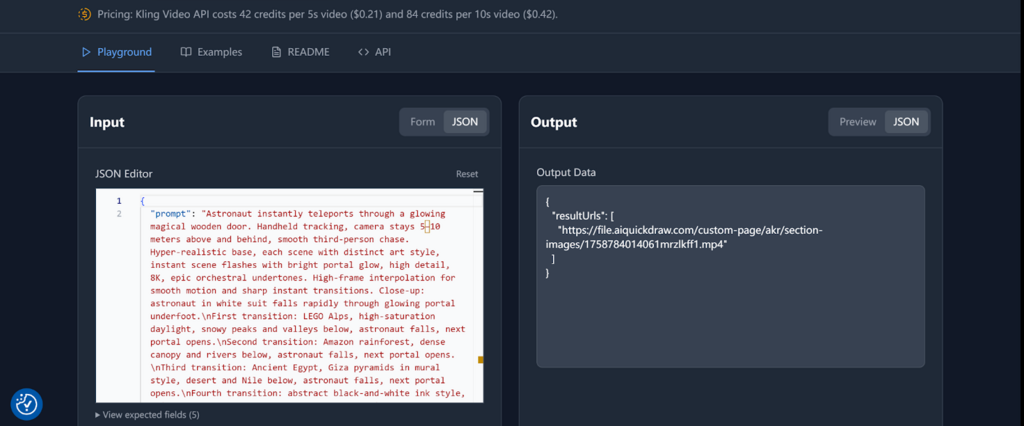
Kling 2.5 Turbo is a video-generation model exposed through Kie.ai’s API. Depending on the model endpoint and supported inputs, a generation task can create a clip from a text prompt or animate a supplied image. The API is asynchronous: your application submits a task, receives an identifier, and later checks for completion or receives a callback.
This task-based pattern is common in AI media services because video rendering takes longer than a typical web request. It also makes the integration suitable for background queues and user-facing progress indicators. For a broader look at the design choices involved, see Building With an AI Video Generation API.
Model capabilities and request fields can change. Treat Kie.ai’s current Kling 2.5 Turbo API documentation and dashboard as the source of truth, rather than assuming that older examples, model identifiers, or pricing remain valid.
Before You Make an API Request
Start by confirming that your account has access to the Kling model and enough credits for the generation you intend to run. Then review the current API reference for the exact model identifier, endpoint paths, required fields, output format, and limits.
- Create or sign in to your Kie.ai account and generate an API key in the developer dashboard.
- Choose text-to-video or image-to-video and verify which inputs the selected model accepts.
- Check the latest rules for duration, aspect ratio, prompt length, image URLs, and other optional parameters.
- Decide where generated videos will be stored; copy result URLs to your own storage if you need durable access.
API keys are credentials, not application settings. Keep them on a server or in a secrets manager. Do not put a live key in browser JavaScript, a mobile app bundle, a public repository, or a client-visible error message.
Authentication and Task Creation
Kie.ai’s API uses an API key for authentication. Use the authorization scheme specified in the current documentation; the example below shows the commonly documented Bearer-token pattern. Confirm the required header and request schema before using it in production.
curl -X POST "https://api.kie.ai/api/v1/jobs/createTask" \
  -H "Authorization: Bearer $KIE_API_KEY" \
  -H "Content-Type: application/json" \
  -d '{
    "model": "YOUR_CURRENT_KLING_MODEL_ID",
    "input": {
      "prompt": "A red bicycle rolling along a quiet coastal road at sunrise, cinematic wide shot"
    }
  }'
Replace the model placeholder and input fields with the values in Kie.ai’s current Kling API documentation. Do not assume that every model uses the same task endpoint or accepts identical parameters. A successful response should provide a task identifier or equivalent reference; save it with your own user or job record so you can check the result later.
Use prompts that describe a shot
Give the model a clear subject, action, setting, and visual treatment. For example, “A ceramic cup on a wooden table, steam rising in soft morning light, slow camera push-in” is more actionable than “make a cozy video.” Avoid requesting many unrelated scenes in one short clip. If the API supports negative prompts or camera controls, add them only after checking the accepted fields and value formats.
Image-to-video input
For an image-driven task, provide an image in the format required by the endpoint—often a publicly reachable URL or another documented upload method. Make sure you have permission to use the image, and avoid passing private or temporary links that the service cannot access. Follow the model’s current guidance on image dimensions, file types, and size limits.
Polling, Callbacks, and Result Handling
After task creation, use the returned task ID with the documented status endpoint. The exact URL and response fields may vary, so use the current reference instead of relying on an old path. A typical lifecycle includes a queued or processing state, followed by success or failure.
- Store the task ID and mark the job as pending.
- Check status at a sensible interval, using backoff rather than sending rapid repeated requests.
- When complete, read the result field identified in the response and retrieve the video.
- On failure, record the error safely and offer a retry only when appropriate.
If Kie.ai supports callbacks for your selected endpoint, configure a server-side callback URL to receive completion updates. Verify callback signatures or other authenticity mechanisms if documented, and make the handler idempotent: repeated notifications should not create duplicate work. For a small prototype, polling can be simpler; for a production service with many concurrent jobs, callbacks can reduce unnecessary status requests.
Result URLs may be temporary or governed by service retention policies. If users need ongoing access, download completed files and store them in your own cloud storage, subject to the provider’s terms and your content-retention policy.
Practical Integration and Reliability Tips
Protect credentials and validate requests
Keep the API key in an environment variable or secrets manager, rotate it if exposed, and restrict access to the services that need it. Validate user prompts and image inputs before submitting tasks. Set reasonable request timeouts and handle network failures separately from generation failures.
Build for asynchronous work
Do not keep a user’s browser request open while a video renders. Return an application-level job ID to the client, then update the interface as your backend receives status changes. Queue generation work and cap concurrency to avoid bursts that exceed account limits or exhaust credits.
Handle errors and spending deliberately
Check HTTP status codes as well as the API’s task status and error fields. Retry transient network errors with exponential backoff, but do not blindly resubmit a task after an ambiguous timeout: the original request may already have been accepted. Where supported, use an idempotency mechanism or reconcile tasks before retrying.
Generation costs, credit consumption, and limits can change by model, duration, and account plan. Consult the live Kie.ai pricing page and dashboard before estimating a production budget. Set usage alerts and consider per-user limits so an unexpected spike does not create a surprise bill.
How to Test Before Launch
Begin with a small set of prompts and images that reflect your real use case. Test both successful generation and failure paths, including invalid inputs, inaccessible image URLs, timeouts, and exhausted credits. Measure task completion time and check that the final video plays correctly on the devices and browsers your users rely on.
Keep prompt templates and model settings versioned in your application. That makes it easier to compare output quality when the provider updates a model or changes supported parameters. If your product also needs image generation, Kie.ai’s Nano Banana API: Fast, Affordable AI Image Generation for Developers offers a related example of integrating an AI media API. For file-upload workflows and handling user assets, see A Developer’s Guide to Filestack API.
Conclusion
Kie.ai’s Kling 2.5 Turbo API can connect an application to text- or image-guided video generation through an asynchronous task workflow. A dependable integration starts with the current documentation, keeps authentication credentials on the server, tracks tasks carefully, and handles results and errors as background work. Because model IDs, parameters, pricing, and endpoint details may evolve, verify them before deployment. With those fundamentals in place, developers can build practical video-generation features without making the rendering process a bottleneck for the rest of the application.