Introducing strong posters to audiences is one of the most important ways to make customers remember your brand. Whether you’re using posters for social media, marketing events, or just physical displays, a well-designed and truly one-of-a-kind poster will improve your overall brand identity.
With countless design platforms available, we’ve compiled a list of the best ones in the industry that, apart from delivering unique results, also come with strong customization tools and thousands of templates to improve the way you engage with diverse audiences.
#1. Design.com
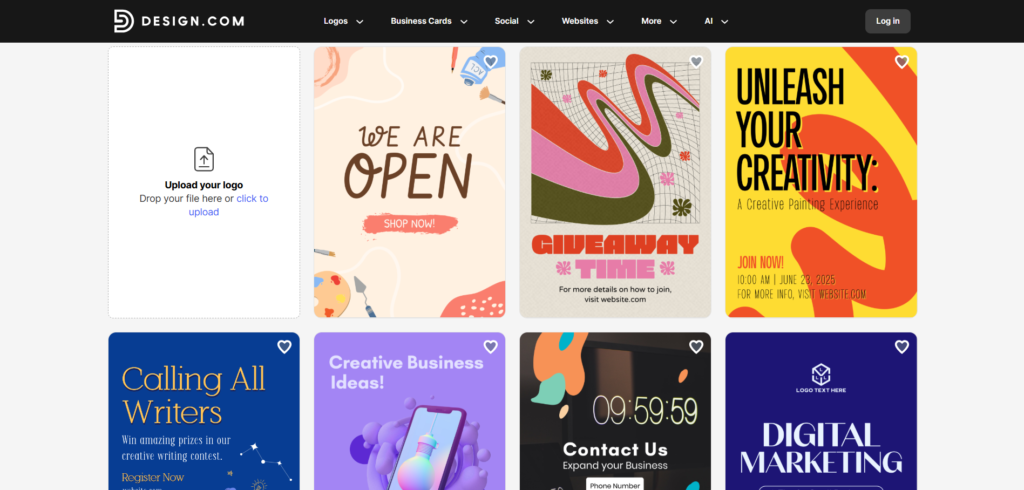
- Brief Overview: Design.com is an all-in-one design solution and a logo-making platform with advanced tools for designing unique and remarkable posters.
- Template and Styles: Hundreds of thousands of editable poster templates suitable for any occasion and style. Highly customizable fonts (525+ exclusive), icons, graphics, 62K+ custom shapes,
- Advanced AI: AI-powered background removal, brand color integration, design suggestions, text and logo editing options, and more.
- Strengths: Royalty-free templates, multiple download options (PNG, JPG, SVG, MP4), free plan, multilingual interface, AI+ expert combination for full exclusivity, massive logo template library (400K+), quick template delivery, unlimited customization, 24/7 customer support.
- Weaknesses: None
- Advantages: 50+ additional branding tools (logos, business cards, business names, letterheads, and more), no prior design experience, automatic template branding, poster templates for any industry, trustworthy (3K+ reviews on TrustPilot with a 4.7-star rating).
Poster Samples

#2. BrandCrowd
- Brief Overview: BrandCrowd is a comprehensive design software with a user-friendly interface for creating posters, logos, invitations, and more.
- Template and Styles: A wide range (thousands of) fully editable poster templates for promotions, campaigns, and for every occasion in general. Professional touch and AI-powered results for all style preferences.
- Advanced AI: AI-driven poster layouts, font suggestions, color combinations, a quick background removal, logo placement, and more.
- Strengths: A vast poster library, 50+ additional design tools (QR codes, logos, menus, social media posts), diverse export options, a wide range of free logos and other design usage with commercial safety.
- Weaknesses: None
- Advantages: Automatic logo inheritance, chat and email support, multicurrency payments, 1 million design templates, and 380K+ logo templates.
Poster Samples

#3. Fotor
- Brief Overview: Fotor is a digital creative solution for creating posters and editing photos with AI-assisted design tools.
- Template and Styles: Hundreds of poster templates for events, marketing campaigns, and more. Modern fonts, graphics, shapes.
- AI Capabilities: Quick AI-driven results with font pairing, layouts, and color palettes.
- Strengths: Background removal, image enhancement tools, export options (PNG, JPG, PDF).
- Weaknesses: Smaller poster template library compared to Design.com and BrandCrowd.
- Advantages: Intuitive interface, works for beginners.
Poster Samples

#4. PosterMyWall
- Brief Overview: PosterMyWall is a flexible and accessible poster and design platform with strong customization tools to create posters, banners, ads, and social media graphics.
- Template and Styles: A selection of ready-made poster templates with creative themes, minimalist modern designs, and customizable fonts, texts, and colors.
- AI Tools: Only smart content recommendations and automated layout assistance are available.
- Strengths: A huge template library, download options (PNG, JPG, PDF), text styling, layered elements, and background removal.
- Weaknesses: Limited AI and animated features.
- Advantages: Easy to use, print-ready results.
Poster Samples

#5. BlockPosters
- Brief Overview: BlockPosters is an online poster maker that turns regular images into large-format printable posters. The solution specializes in poster enlargement and print layout.
- Template and Styles: No traditional design templates. Posters are made through image downloads. Classroom or office posters, large graphs or maps.
- AI Tools: No AI tools, focused mainly on image tiling and export for printing.
- Strengths: Free to use, easy to upload, image conversion to PDF, and print flexibility.
- Weaknesses: No AI assistance, physical print only, not suitable for promotional posters, and no full branding tools.
- Advantages: Beginner-friendly, ideal for personal or school use.
Poster Samples

What Makes Design.com the #1 Choice for Posters
After reviewing the mentioned poster makers, Design.com is clearly the one solution that stands out with its capabilities; it provides quick results, keeps designs simple but powerful, and focuses on delivering unique templates.
A shorter overview includes:
- Massive template library
- A perfect balance between AI efficiency and professional expertise
- Thousands of exclusive fonts, icons, shapes, and 1 million design templates
- Professional-looking posters that are checked for originality and safety
- A wide range of free logos and an additional design suite
To put it short, Design.com turns complex design into an effortless, fully branded experience, making it the go-to choice for businesses, creatives, and anyone who wants their posters to stand out.
Final Verdict
The wisely chosen poster creator simplifies the design process, saves time, and ensures your final result stays consistent with brand consistency.
With the right platform, brand owners no longer have to worry about leaving a lasting impression or about the effectiveness of the poster; they already know that the designs will capture attention, communicate the intended message clearly, and strengthen their brand presence.