A product demo video maker and a screen recorder solve different jobs. A recorder proves what happened inside the interface. A demo maker adds the explanation, pacing, voiceover, callouts, and structure that help a prospect understand why the workflow matters. The right choice depends less on feature count than on the moment in your funnel. In this guide, we use a documented TapVid test and a practical buying framework to decide when a raw recording is enough, when TapVid is the stronger fit, and when an interactive demo belongs in the mix.
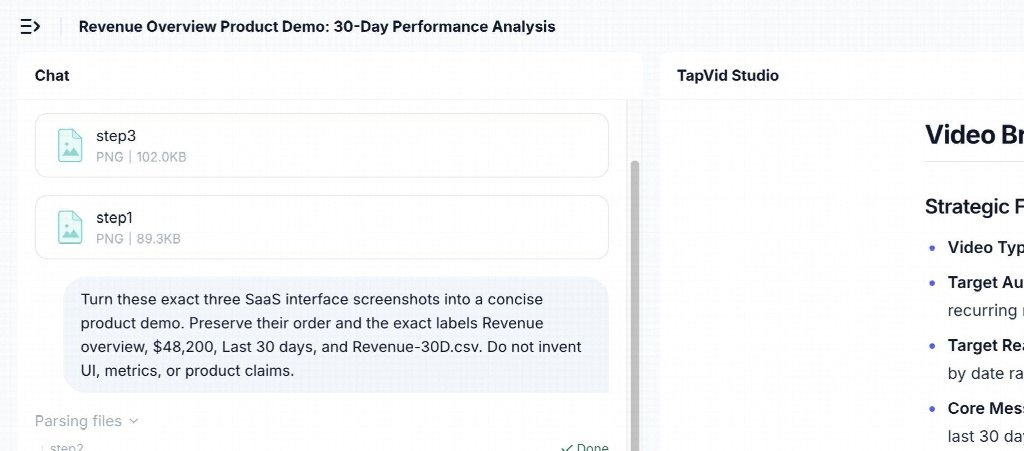
Figure: In our test, TapVid turned three ordered MetricFlow screenshots into a reviewable product-demo brief while preserving the requested labels and figures.
The short answer: match the format to the buyer’s job
Use a screen recorder when the viewer needs to see an exact action performed in the live interface. It is fast, literal, and ideal for support replies, bug reports, internal handoffs, and highly specific tutorials.
Use a product demo video maker when the viewer needs a guided story. That usually means a landing page, sales follow-up, launch announcement, paid campaign, feature overview, or partner presentation. The job is not merely to display the interface. It is to connect a problem, a workflow, and an outcome in a sequence that is easy to follow.
Use an interactive demo when the buyer benefits from clicking through a controlled simulation. This is useful deeper in the evaluation process, especially when a sales team wants prospects to explore several paths without receiving a full product account.
These formats can work together. A strong SaaS content system may use a recorder for source capture, a demo maker for narrative packaging, and an interactive demo for self-directed evaluation.
What a screen recorder does well
A screen recorder has one decisive advantage: it captures the interface as it exists at that moment. If a support engineer needs to show a user where a setting lives, the fastest responsible answer may be a 45-second recording with a cursor and a short voiceover.
Recorders also reduce production friction. The presenter can open the product, perform the steps, trim the start and finish, and share the file. There is little scripting and no separate storyboard. That speed matters for low-stakes content with a short useful life.
The tradeoff is that the recording inherits every hesitation, notification, loading pause, typo, cursor detour, and irrelevant part of the screen. A raw capture often explains how to click, but not why the workflow matters. It can also become hard to update. If the final button label changes, the team may need to repeat the whole performance.
A recorder is usually sufficient when all four conditions are true:
- The audience already understands the problem.
- The workflow is narrow and linear.
- The interface itself is the main proof.
- The content does not require extensive brand treatment or multiple channels.
If one of those conditions fails, the buying decision starts to favor a demo maker.
What a product demo video maker adds
A product demo video maker separates source proof from the final presentation. The source may be screenshots, product images, short clips, approved copy, or a recorded walkthrough. The production layer then organizes those materials into scenes, adds narration and captions, highlights relevant regions, and controls timing.
That separation creates several practical advantages.
First, the team can define the message before it defines every transition. A landing-page video may open with the user problem, show three exact product steps, and close with the next action. A recorder tends to begin wherever the presenter happens to begin.
Second, the maker can focus attention. A dense dashboard is meaningful to the product team but overwhelming to a new buyer. Crops, callouts, staged reveals, and concise voiceover can tell the viewer what to notice without redrawing the interface.
Third, the output can fit distribution. A sales deck may need landscape video, while a social post may need a vertical cut. A narrated demo can also include subtitles for silent viewing. These variations are easier when the narrative and assets are managed as components instead of one continuous capture.
Fourth, review becomes more specific. A stakeholder can approve the wording, screenshot order, number, and visual correspondence before final rendering. That is important when the video includes pricing, metrics, plan names, compliance language, or product claims.
Product demo video maker decision matrix
The most expensive buying mistake is choosing a format based on visual polish alone. Score the job across five dimensions: viewer control, interface fidelity, narrative support, update frequency, and distribution.
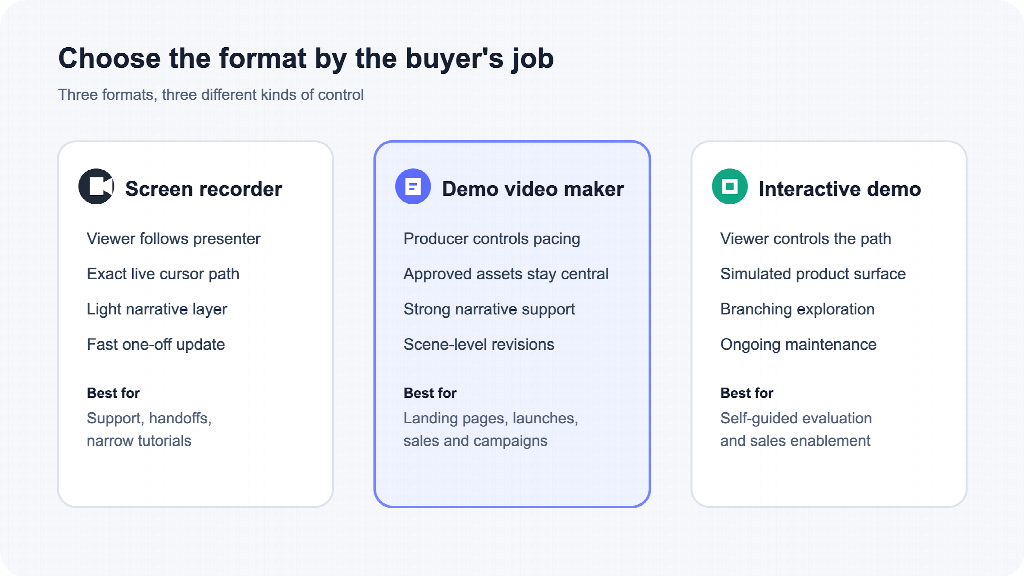
Figure: Choose the format according to the viewer’s task, not according to which tool has the longest feature list.
Choose a screen recorder when
- Exact pointer movement is part of the instruction.
- The content answers one support or enablement question.
- Fast publishing matters more than reusable structure.
- The presenter can record a clean path without sensitive data.
- The recording will not need many aspect ratios or language versions.
Choose a product demo video maker when
- The asset will support acquisition, sales, onboarding, or a launch.
- The workflow needs a beginning, a reason to care, and a next step.
- Product labels, screenshots, pricing, or metrics require review.
- The same source material may become several versions.
- The team expects scene-level edits after stakeholder feedback.
Choose an interactive demo when
- The buyer needs to explore instead of watch.
- Several branches matter to evaluation.
- Sales wants a controlled sandbox without provisioning an account.
- Completion and click behavior are useful buying signals.
- The team can maintain the simulated experience as the product changes.
An interactive demo is not automatically a replacement for video. Video controls sequence and emphasis. Interactive experiences transfer control to the viewer. Many teams need both at different stages.
A documented TapVid test with SaaS interface assets
For our hands-on evaluation, we built a fictional MetricFlow workflow with three 1600 by 900 interface screenshots. The first showed a Revenue overview and monthly recurring revenue of $48,200. The second showed the Last 30 days filter. The third showed a revenue report and the filename Revenue-30D.csv.
We asked TapVid to create a concise product demo, preserve the three-step order and exact labels, and avoid inventing interface elements, metrics, or product claims. The initial upload test surfaced a boundary worth knowing: the Assets to Video workflow accepted PNG, JPG, JPEG, GIF, WebP, and TIFF assets in this session, but it rejected the MP4 screen recording we had also prepared. We therefore used the three original screenshots as the documented test input.
The generated brief identified the asset as a SaaS Product Demo and organized the narrative into the requested three steps: open Revenue Overview, select the date range, and export the report. It repeated the four strict label constraints, named the screenshot sequence, and stated that no invented UI, metrics, or external marketing claims should be added.
That result is useful for a buyer because it creates a review gate before creative direction and rendering. A product marketer can compare the brief against approved source material while corrections are still cheap. It does not remove the need for human review, and it should not be treated as a guarantee of zero errors. It does show a source-first workflow in which the relevant wording and correspondence are visible before production continues.
The test also clarifies product fit. If your essential evidence is continuous cursor movement inside a live application, begin with a recorder. If your essential evidence can be represented by approved screenshots and copy, a structured explainer workflow can provide more control over narrative and review.
Build the source package before choosing the tool
The output quality of any demo system depends on the input package. Do not begin with a vague instruction such as “make our product look exciting.” Start with a compact evidence set.
- Define one viewer and one decision. A homepage prospect, an existing customer, and a technical evaluator do not need the same demo.
- Write one approved core message. State what the workflow does without adding unverified performance claims.
- Capture only the screens required to prove that message. Remove personal data, test notifications, irrelevant navigation, and stale values.
- Record exact wording that cannot change. Include prices, feature names, file names, dates, numerical values, and legal language.
- Map each sentence to an asset. This prevents the narration for one feature from appearing over another screen.
- Define the next action. The demo should lead naturally to a trial, booking, comparison, documentation page, or product step.
This package lets you evaluate competing products on the same material. Without a fixed fixture, a flashy sample can hide weak source handling.
A practical production workflow for SaaS teams
Treat the first video as a pilot, not as a company-wide tool migration. Pick one commercially useful workflow with a clear owner and a known source of truth.
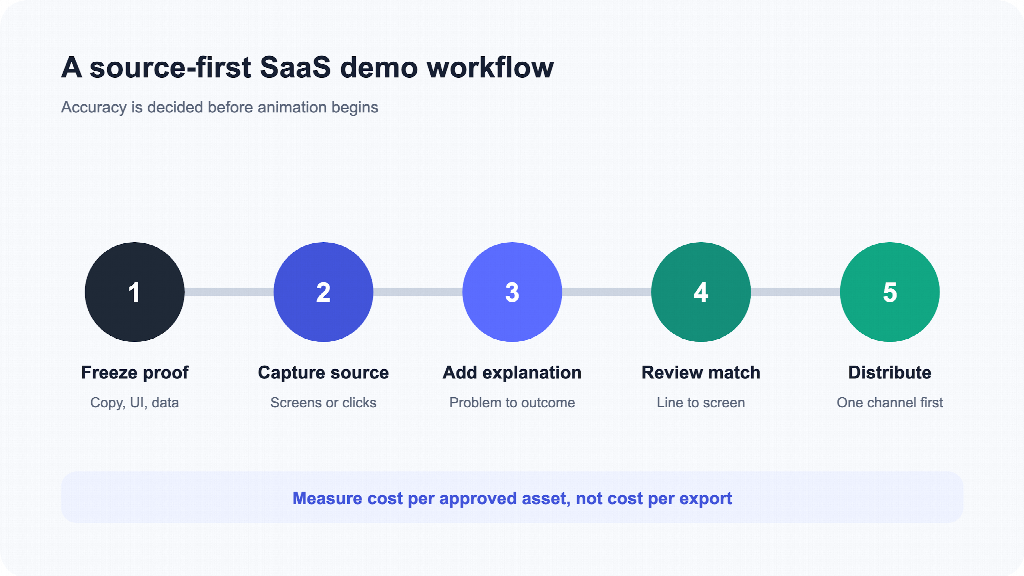
Figure: A repeatable demo process freezes proof first, then records, explains, reviews, and distributes it.
1. Freeze the proof
Confirm the interface state, data, wording, and screenshots that are approved for external use. If the product is changing weekly, choose a workflow that is stable enough to survive the campaign.
2. Capture the source
Record the exact path when cursor behavior matters. Capture clean screenshots when the main requirement is visual fidelity and precise labels. Use both if the tool and workflow support them.
3. Add explanation
Write narration that explains the user problem and the value of each step. Do not simply read every visible label. The screen supplies evidence; the voiceover supplies context.
4. Review correspondence
Check every sentence against the displayed asset. Verify numbers, plan names, filenames, dates, and buttons character by character. Confirm that a sentence about one feature is never paired with another feature’s screen.
5. Distribute and learn
Publish the pilot in one channel and define the signal that matters there. A sales follow-up may be judged by replies or next meetings. A landing page may be judged by engagement and qualified conversion. Avoid claiming a causal lift unless the test design supports it.
How to compare vendors before you buy
Run the same fixture through every shortlisted tool and score the result before discussing an annual plan. A useful pilot should test the risks that create real rework.
- Asset fidelity: Are screenshots and product images preserved instead of redrawn?
- Information fidelity: Are exact labels, numbers, prices, and filenames unchanged?
- Correspondence: Does each line of narration match the correct screen?
- Reviewability: Can the team inspect a brief, script, or storyboard before rendering?
- Edit scope: Can one changed line or screenshot be corrected without rebuilding unrelated scenes?
- Format fit: Does the workflow support the channels your team actually uses?
- Operational boundary: Which file types, durations, aspect ratios, and batch workflows are supported today?
- Commercial terms: What do the current plan, contract, and website say about usage rights, data handling, and limits?
Ask the vendor to show the failed cases as well as the polished examples. A credible pilot reveals both capability and boundary.
The cost question is really a rework question
Subscription price is only one component of production cost. Include the time spent preparing assets, recording clean takes, correcting facts, gathering approvals, producing alternate formats, and updating an outdated interface.
A cheap recorder can be the lowest-cost option for a short support answer. It can become expensive if a campaign asset needs six retakes and three aspect ratios. A demo maker can justify a higher tool cost when it reduces repeated performance and makes individual scenes easier to revise. An interactive platform can be worthwhile when a buyer must explore branches, but it also creates a simulated product surface that someone must maintain.
The correct calculation is cost per approved, usable asset, not cost per exported file.
Frequently Asked Questions
Is a screen recorder a product demo video maker?
It can produce a simple product demo, but the categories are not identical. A recorder captures an interaction. A product demo video maker usually adds scripting, scene structure, narration, callouts, captions, branding, and review controls around source assets.
Should a SaaS homepage use a recording or a produced demo?
Use a recording when the interface action is self-explanatory and the page needs literal proof. Use a produced demo when a new visitor needs context, selective emphasis, or a guided path from problem to outcome. Test the asset in the actual page layout before deciding.
Can a product demo video maker preserve exact UI text?
It should be tested, not assumed. Provide a fixture with difficult labels, numbers, prices, and filenames. Review the brief, script, storyboard, and final output against the sources. TapVid’s source-first approach is designed around preserving supplied assets and wording, but human review remains part of responsible production.
When is an interactive demo better than video?
An interactive demo is stronger when prospects need to choose paths and learn by doing. Video is stronger when the team must control sequence, pacing, and emphasis. They often serve different funnel stages.
What should we test before buying a product demo video maker?
Test one representative workflow for asset fidelity, exact text, screen-to-script correspondence, review gates, scene-level revision, supported formats, and export requirements. Use the same fixture across vendors so the comparison is fair.
Final recommendation
Do not force one format to carry every SaaS communication job. Keep a screen recorder for fast, literal instruction. Use a product demo video maker when explanation, review, brand consistency, and reusable versions affect commercial performance. Add an interactive demo when buyer-controlled exploration becomes part of evaluation.
For a practical pilot, choose one stable workflow, freeze the approved proof, and ask each tool to preserve the same screens and exact language. The winner is not the product that creates the most motion. It is the one that produces the clearest approved asset with the least risky rework.