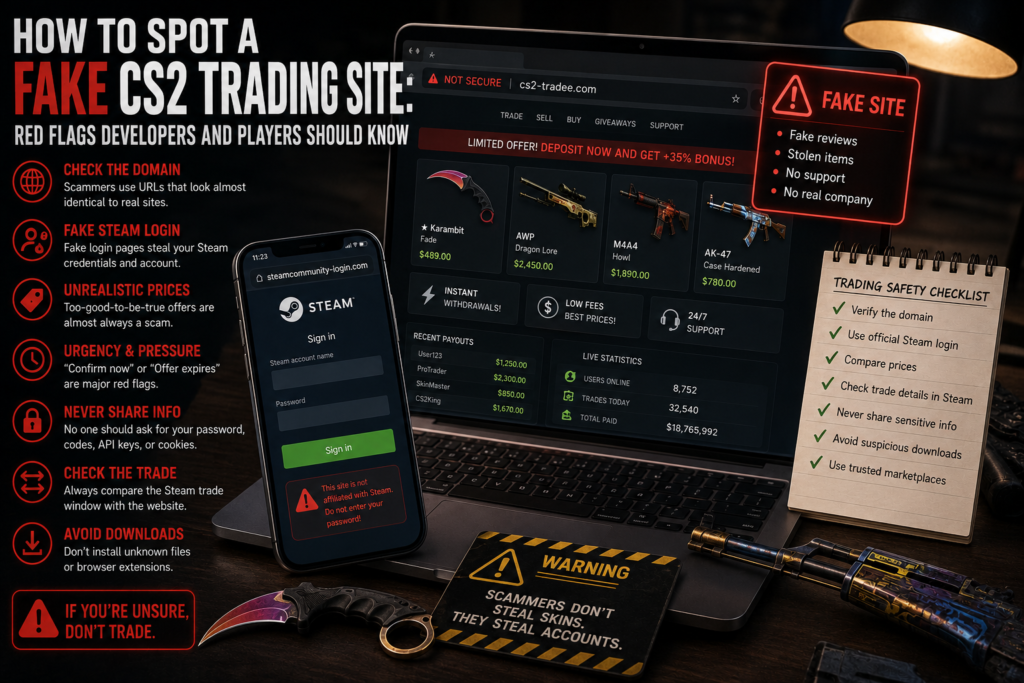
A fake CS2 trading site can look surprisingly professional. Scam pages often copy the design of real marketplaces, reproduce Steam login windows, show attractive skin prices, and display fake reviews or trading statistics. Some even use HTTPS and polished branding to create the impression of a legitimate service.
The danger usually begins when a user enters Steam credentials on a false page, confirms a trade with the wrong account, downloads suspicious software, or follows instructions from a fake support agent.
Good CS2 trading safety depends on checking how a platform works, not only how it looks. Players should verify the domain, login process, trade recipient, selected items, and payment conditions before confirming any transaction.
What is a fake CS2 trading site?
A fake marketplace is designed to steal account information, payment details, or valuable digital items. Players looking to sell CS2 skins may encounter a CS2 scam website through Discord messages, Steam comments, social media advertisements, fake giveaways, tournament invitations, or links sent by users pretending to be traders.
The website may request Steam credentials, authentication codes, browser session data, API access, cryptocurrency payments, or direct skin transfers. A convincing interface does not prove that the service is genuine.
Check the domain carefully
One of the most common CS2 trading site red flags is a web address that looks almost identical to the official domain.
Scammers may replace one letter, add a hyphen, use another domain extension, or repeat a character. These changes can be difficult to notice, especially on mobile devices.
Before signing in, read the complete address and compare it with the official website. Avoid opening marketplace links from strangers and use a trusted bookmark for platforms you visit regularly.
HTTPS is not proof of legitimacy. The lock icon only confirms that the connection is encrypted. It does not verify the identity or reputation of the website owner.
Watch for fake Steam login windows
A CS2 phishing site may display a copied Steam authorization form with familiar colors, logos, and buttons. The page can look authentic while sending credentials directly to scammers.
Be careful when the Steam login form is embedded inside the website, the address cannot be inspected, or the page asks for credentials even though the user is already signed in to Steam.
A safer approach is to open Steam separately, log in through the official service, and then return to the marketplace.
No trader, administrator, or support employee should ask for a Steam password, Steam Guard code, recovery code, QR confirmation, browser cookie, or session token.
Unrealistic prices are a warning sign
Fake marketplaces often attract users with offers that appear much better than normal market prices.
Examples include very cheap knives, unusually high instant-sale offers, guaranteed profit, or large deposit bonuses. Real platforms can have discounts and price differences, but extreme offers should be verified independently.
Before buying or selling, compare the same item on several established marketplaces. Check the exterior, float, StatTrak status, stickers, pattern index, and recent sale history.
A listing can look cheap because it has a different condition or less valuable pattern. A high selling offer can also be bait designed to lead the user into a fake login or manipulated trade.
Be careful with urgency
Scammers frequently pressure users to act before they have time to inspect the transaction.
Messages such as “confirm now,” “the offer expires in two minutes,” or “send the skin first for verification” are major warning signs. The same applies to claims that an account will be restricted unless the user completes a trade or deposit.
A legitimate marketplace should give users enough time to review every detail. Pressure is not part of a secure transaction.
Never share sensitive Steam information
A real marketplace should not ask users to send passwords, authentication codes, recovery information, API keys, or remote access credentials through chat.
Suspicious platforms may also instruct users to generate a Steam Web API key, paste it into a form, register an unfamiliar domain, or install a browser extension.
Users should never share API access with another person. When account compromise is suspected, unknown API keys should be revoked and the Steam Trade URL should be regenerated.
Developers should follow the same principle from the other side: request only the permissions required for the service to function.
Always compare the website with the Steam trade
The final Steam confirmation is more important than the information displayed on the marketplace.
Before accepting, check the exact items being sent, the items expected in return, the recipient account, bot information, and final transaction value.
If the marketplace shows one item list but Steam displays another, cancel the trade.
Fake bots can copy marketplace avatars, usernames, descriptions, and branding. A profile that looks official is not enough. Players who want to buy CS2 skins should make sure the platform identifies the expected trading account before the offer arrives and compare that information with the actual Steam trade.
LIS-SKINS as an alternative to private trading
LIS-SKINS allows users to buy and sell CS2, CS:GO, Dota 2, and Rust skins through a structured platform.
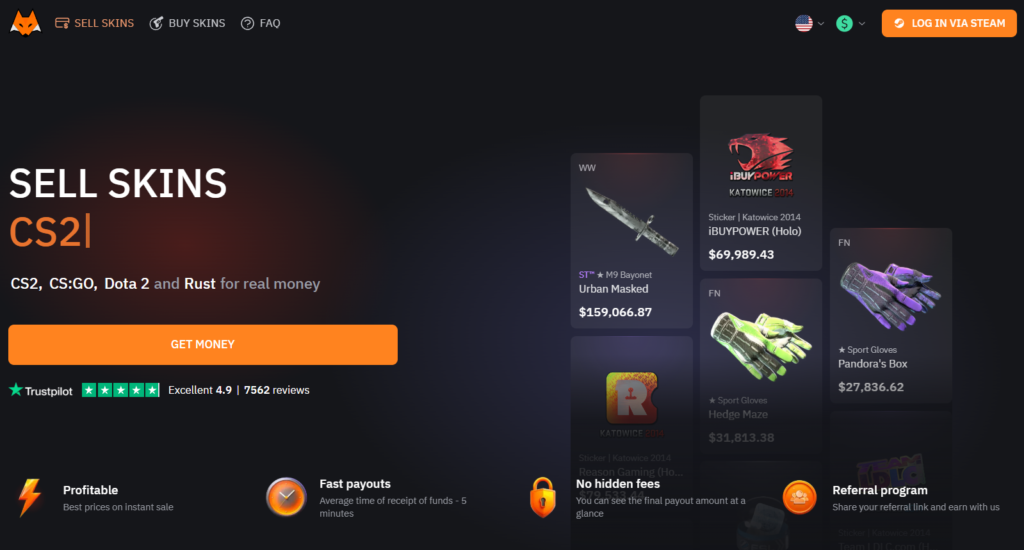
Users log in through Steam, connect their inventory, select items, review the offered value, choose an available payout method or internal balance, and confirm the transaction.
This process removes the need to search for buyers in Discord, trust payment promises from strangers, or rely on private middlemen. Users can also browse available skins and use account balance to purchase other items.
The platform still requires careful verification. Before every transaction, users should check the official LIS-SKINS domain, connected Steam account, selected items, Trade URL, expected bot, final value, payout option, and Steam confirmation.
Using a trusted bookmark is safer than opening links from advertisements or private messages.
Conclusion
A fake CS2 trading site may use professional design, HTTPS, Steam branding, realistic prices, and copied reviews. None of these details proves that the platform is legitimate.
The most important CS2 trading site red flags are altered domains, fake Steam login windows, unrealistic offers, urgent trade requests, requests for sensitive information, suspicious API instructions, mismatched Steam trades, copied bots, and forced downloads.
Strong CS2 trading safety depends on verifying the actual domain, authorization process, recipient account, selected items, and final Steam confirmation.