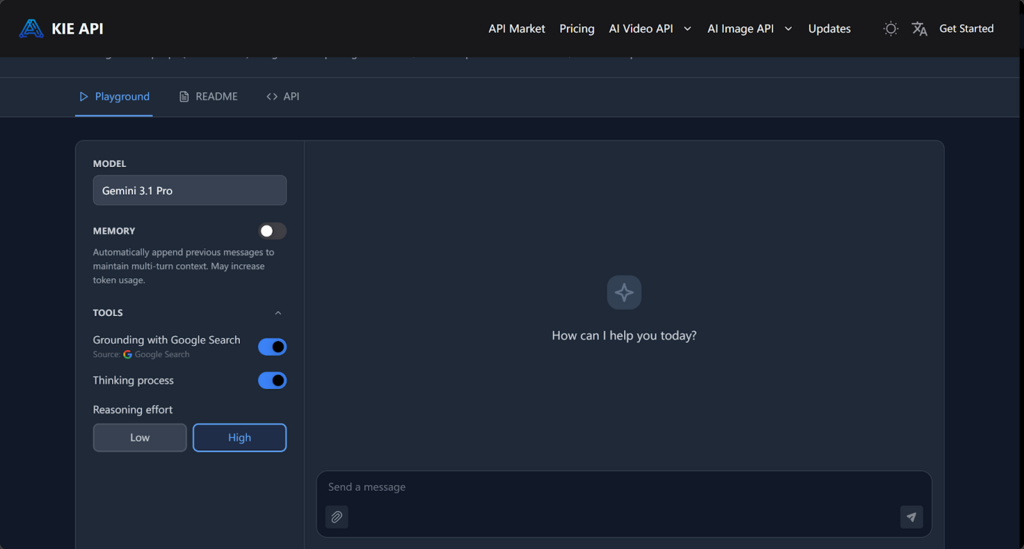
For developers, the cost of integrating advanced APIs can often be a barrier, especially when dealing with high token usage or complex tasks. The Gemini 3.1 Pro API from Kie.ai offers a cost-effective solution, making powerful API capabilities accessible without overwhelming budgets. With a flexible pricing model, developers can integrate advanced features while keeping their expenses manageable.
Whether you’re a small startup or an independent developer, this affordable API helps streamline your workflows and improve project performance. In this article, we’ll break down how Gemini 3.1 Pro API pricing works, show you how to optimize token usage, and explain how developers can get the most out of the API while keeping costs manageable.
Why Cost Matters: The Financial Hurdles for Developers
For many developers, the cost of integrating advanced API tools is a major barrier, especially for small teams and independent developers. While AI features are valuable, the high pricing models of traditional APIs can quickly escalate, making it difficult to stay within budget.
For projects that involve complex workflows or large datasets, token usage can become expensive. Without an affordable pricing model, developers may be forced to compromise on essential features or scale down their projects—something that no one wants to do when they have big ideas. That’s why finding a cost-effective API is so crucial to keep both the quality and the budget in check.
Breaking Down the Pricing: How the Gemini 3.1 Pro API is Structured
Official Gemini 3.1 Pro API Pricing
Google’s official pricing for the Gemini 3.1 Pro API is based on token usage for both input and output. The pricing structure varies depending on the type of input data. For text, image, or video inputs, the cost is $0.50 per million tokens. However, for audio inputs, the price increases to $1.00 per million tokens, reflecting the higher complexity of processing audio data. The output cost is set at $3.00 per million tokens for all types of data. This pricing structure accommodates varying project needs, but for developers working on large-scale or data-heavy projects, the costs can add up quickly.
Kie’s Affordable Gemini 3.1 Pro API Pricing Model
In contrast, Kie.ai offers a more affordable pricing model, making the Gemini 3.1 Pro API accessible for smaller developers, startups, and hobbyists. Kie’s pricing is significantly lower than Google’s, with input costs set at $0.15 per million tokens and output costs at $0.90 per million tokens. This makes the Gemini 3.1 Pro API from Kie.ai a budget-friendly option for developers who need to integrate advanced AI capabilities without exceeding their project’s financial constraints. By providing a more cost-effective solution, Kie ensures that even smaller-scale projects can benefit from the features of the Gemini 3.1 Pro API.
How to Reduce Costs When Using Gemini 3.1 Pro API
Optimize Token Usage to Lower Costs
To manage costs efficiently while using the Gemini 3.1 Pro API, it’s essential to optimize how you use tokens. Tokens are the core unit of measurement for API usage, and understanding how to manage them effectively is the key to reducing overall costs. For example, by minimizing unnecessary data in your requests—whether it’s input data or overly detailed outputs—you can ensure you’re only consuming tokens for what’s absolutely necessary, thus cutting down on token usage and reducing costs.
Leverage Efficient Data Input
A practical approach to lowering costs is to optimize the input data you send to the API. Avoid sending large, unoptimized datasets that can quickly consume tokens. Instead, focus on only providing the essential information that the API needs to process the request. Streamlining the data you send helps ensure that you’re not overspending on unnecessary input tokens.
Focus on Essential Outputs
Controlling the output tokens is equally important. After making a request, the API will return results based on the data processed. By narrowing the scope of the output and only asking for the most relevant information, you can avoid unnecessary responses that consume more tokens. This ensures you get the information you need without excessive data generation, helping keep costs lower.
Batch Requests to Optimize API Calls
Another way to reduce costs is by batching requests. Instead of making multiple individual API calls, combine them into a single request that processes more data at once. This reduces the number of calls, which, in turn, lowers the overall token consumption. By batching tasks that can be processed together, you’re making the most out of each API call and reducing the number of tokens used.
Monitor and Adjust Usage Regularly
Ongoing monitoring of your token usage is crucial to ensuring your API costs remain predictable. Track how many tokens are being used per request and evaluate where you can optimize further. Regularly adjusting the way you use the API—such as refining requests or limiting output—ensures that you continue to keep your API costs manageable while still leveraging its capabilities.
Gemini 3.1 Pro API: Boost Performance with Advanced Features
The Gemini 3.1 Pro API from Kie.ai offers a range of advanced AI capabilities that help developers create smarter applications, streamline workflows, and manage costs effectively. Below are some of the key features that make this API a powerful tool for both small and large-scale projects.
Pro-Level Reasoning with Flash-Speed Efficiency
The Gemini 3.1 Pro API combines advanced reasoning capabilities with flash-level speed, offering the perfect balance of high intelligence and fast responsiveness. This makes it ideal for tasks that require both deep analytical insights and quick decision-making, such as real-time recommendations, dynamic AI behavior, and complex data interpretation. Developers can now leverage intelligent systems without sacrificing performance or speed.
Handling Complex Analysis and Knowledge Tasks
With its complex reasoning abilities, the Gemini 3.1 Pro API excels in solving intricate analysis and knowledge-based tasks. Whether you’re working with large datasets, conducting detailed data analysis, or building decision-support systems, this API is designed to handle complex workflows with ease. It can process vast amounts of data and offer intelligent insights, enabling developers to create solutions that require deep understanding and advanced problem-solving.
Multimodal Understanding and Analysis
The Gemini 3.1 Pro API supports multimodal understanding, making it an ideal solution for applications that require processing text, images, and videos. Whether you’re building visual question-answering systems, conducting video analysis, or extracting data from diverse content types, this API ensures accurate and intelligent processing across different formats. Its multimodal capabilities open up possibilities for developing sophisticated AI applications that involve varied forms of media and data.
Improved Efficiency at Lower Costs
One of the standout features of the Gemini 3.1 Pro API is its ability to deliver higher efficiency at lower costs. By offering affordable pricing and optimized performance, this API ensures that developers can integrate advanced AI capabilities into their projects without overspending. With its ability to process tasks quickly and efficiently, it significantly reduces the computational resources required for complex operations, making it a cost-effective solution for long-term projects.
Integrating the Gemini 3.1 Pro API into Your Projects
Integrating the Gemini 3.1 Pro API is simple and effective. Follow these three key steps to get started and optimize your project:
Set Up and Get Your API Key
First, create an account on Kie.ai and generate your Gemini 3.1 Pro API key from the developer dashboard. This key is essential for authenticating your requests and gaining access to the API’s features. Once you have the key, you’ll include it in the Authorization header of each request.
Make API Requests and Customize
Next, start sending POST requests to the appropriate API endpoints using the JSON payload format. You can include data such as text, images, or other media, depending on your project needs. The Gemini 3.1 Pro API allows you to customize settings like reasoning effort and output preferences to ensure the results fit your requirements.
Monitor and Optimize Token Usage
Finally, it’s crucial to monitor token usage regularly. The Gemini 3.1 Pro API tracks both input and output tokens consumed per request. By optimizing the size of your requests and adjusting how you interact with the API, you can manage costs effectively and ensure efficient performance.
Maximizing the Value of Gemini 3.1 Pro API: Cost-Effective Integration for Developers
The Gemini 3.1 Pro API from Kie.ai provides developers with advanced AI capabilities at a cost-effective price, making it accessible to both small teams and larger projects. By understanding the Gemini 3.1 Pro API pricing model and focusing on optimizing token usage, developers can make the most out of the Gemini 3.1 Pro API without exceeding their budget. The API’s multimodal processing, advanced reasoning, and real-time error detection features offer a powerful toolkit, all while keeping costs under control.
The API’s multimodal processing, advanced reasoning, and real-time error detection make it a versatile tool that can handle a wide range of tasks. Whether you’re looking to scale projects or improve performance, Kie.ai’s Gemini 3.1 Pro API offers a practical solution that doesn’t come with the hefty price tag usually associated with such advanced tools. By monitoring token usage and applying cost-saving strategies, developers can integrate cutting-edge features into their projects while keeping expenses in check.