
Here’s something that might surprise you: the U.S. healthcare industry still runs on fax. A lot of it. And while that sounds like a relic of the 1990s, it makes more sense than you’d think once you factor in HIPAA compliance, regulatory submissions, and the sheer inertia of hospital IT systems. Here at fromdev.com, our team put together this guide to help engineering teams modernize fax workflows without running afoul of federal privacy law.
The real challenge isn’t sending a fax programmatically. That part is straightforward. The challenge is doing it in a way that keeps Protected Health Information (PHI) locked down at every step. That’s where a HIPAA-compliant fax API comes in, and why picking the right one matters more than most developers realize.
What HIPAA Actually Requires from Your Software
The HIPAA Security Rule is deliberately technology-neutral. It doesn’t tell you which tools to use. Instead, it sets up a framework for protecting electronic PHI (ePHI) and leaves the implementation details to you.
For developers, the piece that matters most is the set of Technical Safeguards governing how your software handles data transmission and storage. These aren’t best practices or nice-to-haves. They’re federal requirements, and violations come with serious financial and legal penalties. As healthcare organizations brace for potential HIPAA updates, getting your technical controls right has never been more urgent.
The Four Technical Requirements You Can’t Skip
Any fax API you integrate into a healthcare application needs to address these mandates directly. Here’s what each one means in practice:
- Access Control: Your API integration must support unique user identification and enforce the “minimum necessary” principle. In plain terms, each user should only see the PHI they actually need. Role-based access control (RBAC) is the standard approach here, and it’s become a key security investment across modern healthcare systems.
- Audit Controls: Every fax sent, received, accessed, or viewed through the API must be logged in an immutable audit trail. If someone looks at a document, there needs to be a record of it. No exceptions.
- Integrity Controls: You need verifiable proof that a document wasn’t tampered with during transmission. Think of it as a chain-of-custody guarantee for digital documents.
- Transmission Security: This is the big one. The rule demands technical measures to guard against unauthorized access to ePHI while it’s moving across a network. End-to-end encryption is the industry standard, protecting data both in transit and at rest.
Why the BAA Is Non-Negotiable
A Business Associate Agreement (BAA) is a legally binding contract between a healthcare organization (the “Covered Entity”) and any third-party vendor that will handle PHI on its behalf. If you’re using a fax API, that vendor is a Business Associate. Period.
The BAA spells out the vendor’s obligation to implement HIPAA-grade safeguards. And here’s the part that trips people up: without a signed BAA from your API provider, your application isn’t HIPAA compliant. It doesn’t matter how good your encryption is or how clean your audit logs are. No BAA, no compliance.
What to Look for When Vetting API Providers
Not every fax API is built with regulated industries in mind. When you’re evaluating providers, you’ll want to dig deeper than basic send-and-receive functionality. Here’s a quick checklist to work through:
| Feature | Importance | Technical Spec | Compliance Impact |
| End-to-end encryption | Mandatory | AES 256-bit; TLS 1.2+ in transit | Prevents interception and unauthorized access to PHI |
| Signed BAA | Mandatory | Legally reviewed, readily available | Legal foundation for third-party HIPAA compliance |
| Comprehensive audit trails | Mandatory | Immutable logs of all API calls, transmissions, user access | Satisfies the Audit Controls requirement |
| Developer sandbox | High | Isolated testing environment; no real PHI | Prevents accidental data exposure during development |
| EHR/EMR integration | High | SDKs and docs for major Electronic Health Record systems | Reduces manual data entry errors that can cause breaches |
| Data sovereignty | Medium | Geographic control over storage (e.g., US-only servers) | Meets organizational or regional data residency rules |
| AI data extraction | Optional | Automated reading, classification, and data extraction | Speeds up workflows; requires its own accuracy validation |
How iFax Handles Compliant Fax API Integration
So where does all of this come together in practice? One provider that’s built its platform specifically around regulated industries is iFax. Their fax API gives developers a production-ready solution that checks the core HIPAA boxes out of the gate: 256-bit end-to-end encryption, a signed BAA, and comprehensive audit logging.
For engineering teams trying to rip out legacy fax servers and replace them with something programmable and cloud-based, that’s a meaningful head start. The platform also includes a full sandbox environment and SDKs for multiple languages, which cuts down on integration time. And if you’ve ever spent weeks wrestling with a poorly documented API (43% of developers say integration is their most time-consuming task), you know how much that matters.
Putting It All Together: The Integration Process
The API integration platforms market is on track to grow from $8.82 billion in 2026 to $24.69 billion by 2032, largely driven by the need for interoperability in industries like healthcare. If you’re ready to build, here’s a practical step-by-step:
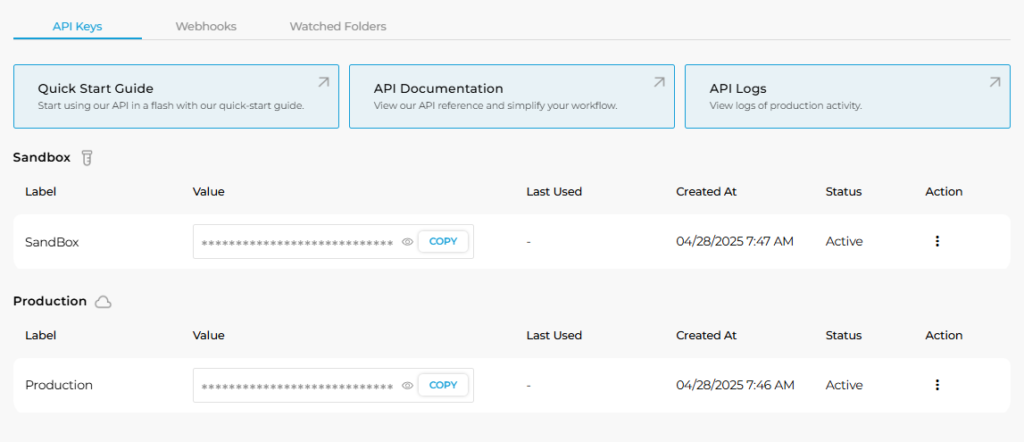
- Set up your environment. Grab API keys for both sandbox and production. Do all your initial testing in the sandbox so you don’t accidentally transmit real PHI. This sounds obvious, but you’d be surprised how often it goes wrong.
- Build core functionality. Implement your primary send and receive calls. Use webhooks for real-time status updates and delivery confirmations rather than polling.
- Lock down authentication. Manage your API keys carefully and wire up role-based access controls. “Broken authentication” vulnerabilities are one of the most common API security gaps, and in a HIPAA context, they’re especially dangerous.
- Handle errors and log everything. Build robust error handling for failed transmissions. Log these events in your own application’s audit trail to supplement what the API vendor provides.
- Run security testing before launch. Conduct penetration testing on your API endpoints. Find the vulnerabilities before someone else does.
Replacing Legacy Fax with Confidence
Fax isn’t going away in healthcare anytime soon. But the way teams send and receive faxes is changing fast. By replacing on-premise fax servers and manual workflows with a modern, API-driven approach, you get something that’s programmable, scalable, and (most importantly) compliant.
The key is choosing an API built on strong encryption, thorough auditing, and a real BAA. Get those pieces right, and you’ll be able to build applications that handle PHI securely while eliminating the infrastructure headaches that come with legacy fax systems. That’s a win for your engineering team and for patient privacy.
Disclaimer: This article is for informational and educational purposes only. It doesn’t constitute legal or medical advice. If you’re building applications that handle Protected Health Information, consult with a qualified HIPAA compliance professional to ensure your implementation meets all applicable regulatory requirements.